Containers take working with clouds to the next level: transport only the essential parts of applications and let the platform provide things such as the operating system and libraries.
The Cloud Container Engine (CCE) in T Cloud Public enables the configuration of containers via virtual machines (ECS). Based on Kubernetes, the CCE is compatible with Docker and offers the option of accessing the public resources of the Docker Hub or the Software Repository for Containers service. The CCE manages clusters, images, templates, and compatible applications, as well as the operation of these applications.
Reasons for CCE in T Cloud Public
Ease of use
CCE allows you to create Managed Kubernetes in only a few clicks and just a few minutes. Manual installation, management and maintenance of Kubernetes are a thing of the past. Additionally, a visual console helps users who are unfamiliar with Kubernetes.
Compatibility and portability
Users benefit from the fact that Cloud Container Engine uses open-source technology. The compatibility with Docker grants access to the public, to open-source image repositories from Docker Hub, and enables the portability of the Kubernetes environment.
Security
The CCE service follows the CIS benchmark guidelines and continuously analyses the latest releases. Regardless of the community release cycle, each CCE Kubernetes version maintenance is supported for approximately two years and is fully GDPR-compliant.
Key Features of CCE
Managed Kubernetes environment
Business acceleration: CCE helps you focus on your business and save time in operating a Kubernetes environment. Get started with pre-configured clusters in just a few minutes instead of a few months.
Cloud integration: The high T Cloud Public integration enables usage of scaled services, including, but not limited to,Elastic Load Balancer (ELB), Object Storage Services (OBS) and Key Management Services (KMS). For example, there is an integrated ingress controller with a functional ELB at the application layer to start without any configuration.
Scalability: From small, single-az-mode clusters with 50x nodes, to highly available clusters with up to 2000x nodes possible in the enterprise environment.
Variability and efficiency: Availability of standard, memory, compute, storage, or AI-optimised resources depending on the use case.
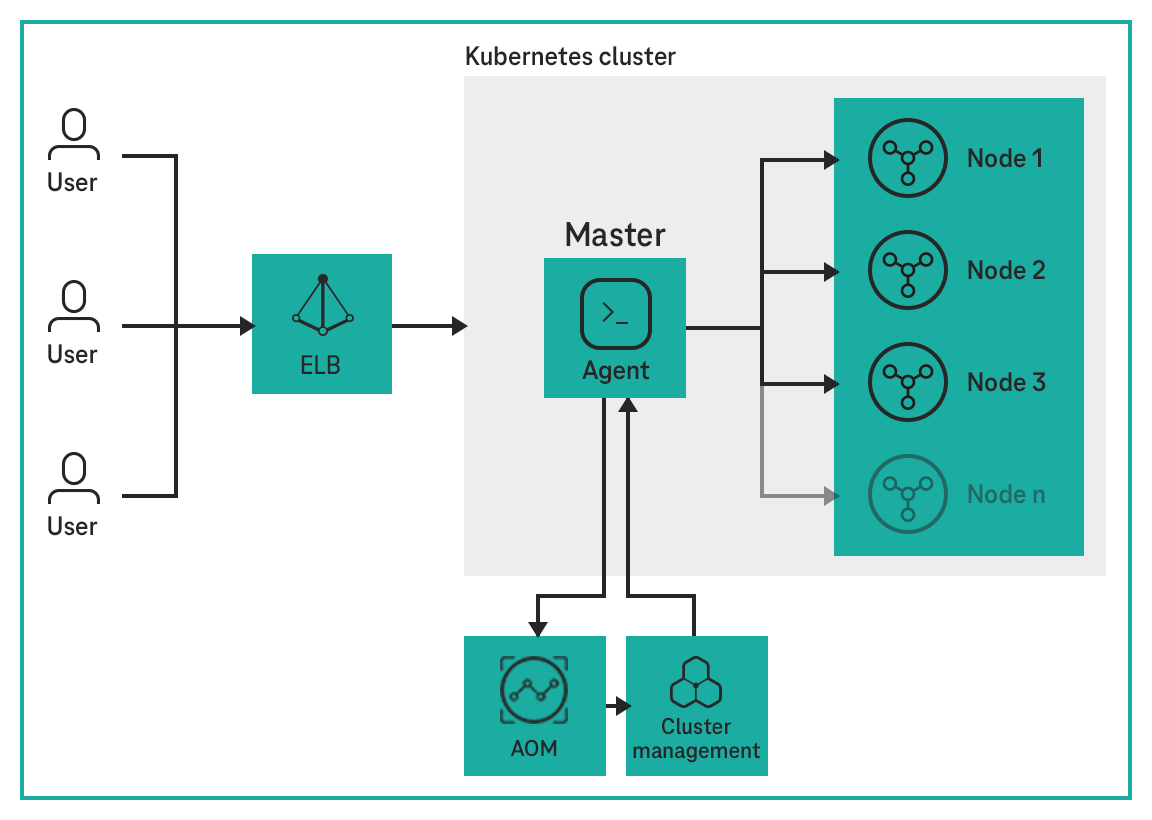
Shared responsibility: The master node will be managed by T Cloud Public and the worker nodes are accessible for the customers.
The costs are based on the use of the cloud resources such as Elastic Cloud Server (ECS), etc. The smallest cluster without HA is free of charge for the CCE service self and can be used for smaller workloads.
Computing resources can be adjusted based on service requirements and preset strategies. The number of cloud servers or containers increases or decreases with service traffic changes, ensuring service stability.
Advantages
Flexibility: Offer multiple scaling policies and scale containers within seconds when specified conditions are met.
High availability: Automatically detect the statuses of pods in auto-scaling groups and replace unhealthy pods with new ones.
Low cost: You only pay for the cloud servers that you use.
Example Scenarios
Website | Online Shop
High Availability Cluster
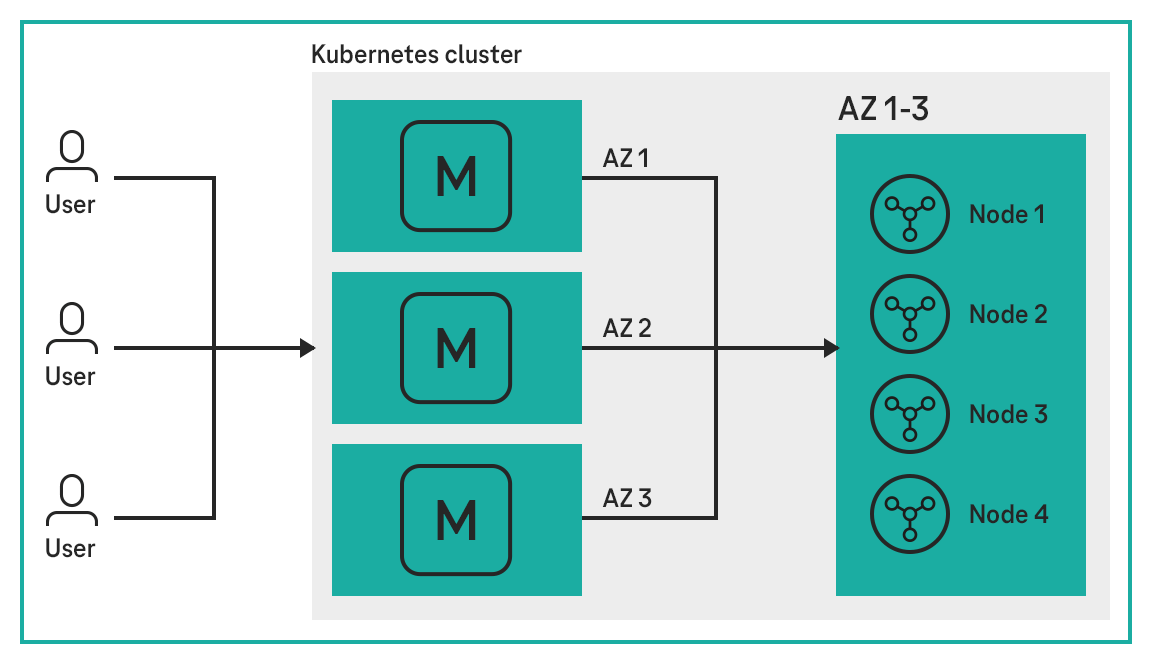
High availability and functionality of an application can be ensured with multiple master nodes distributed over different availability zones. Even if a master node fails, the application will not be affected.
Advantages
High availability: Increased reliability/fail-safety due to multiple master nodes across different availability zones.
Simple setup: Set up native Kubernetes with just one click.
Easy integration: The high availability functionality can be added to every other CCE use case.
Example Scenarios
Financial systems | Medical/health applications | Database applications
GPU Containers
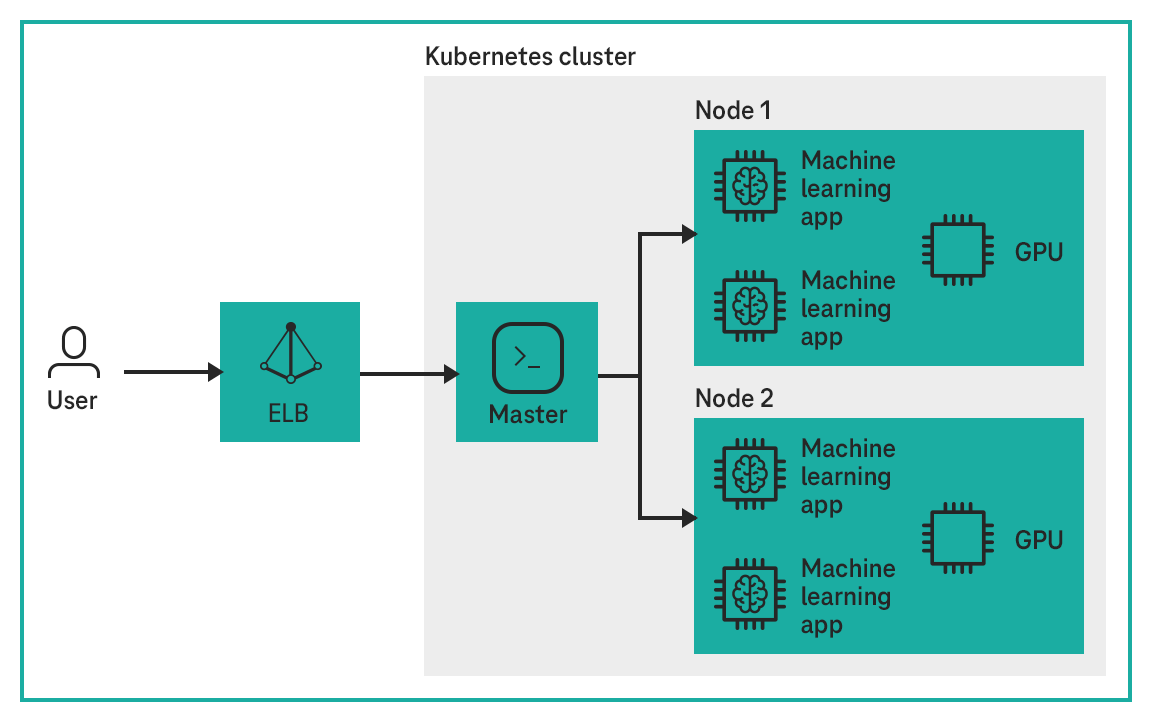
Running containers on high-performance GPU-accelerated cloud servers significantly improves AI computing performance, and GPU sharing among containers greatly reduces AI computing costs.
Advantages
Efficient computing: GPUs are shared and scheduled among multiple containers, greatly reducing computing costs.
Interoperability with ModelArts: Move data from machine learning applications between CCE clusters and ModelArts.
Example Scenarios
Training of machine learning applications | CEA applications | Scientific computing
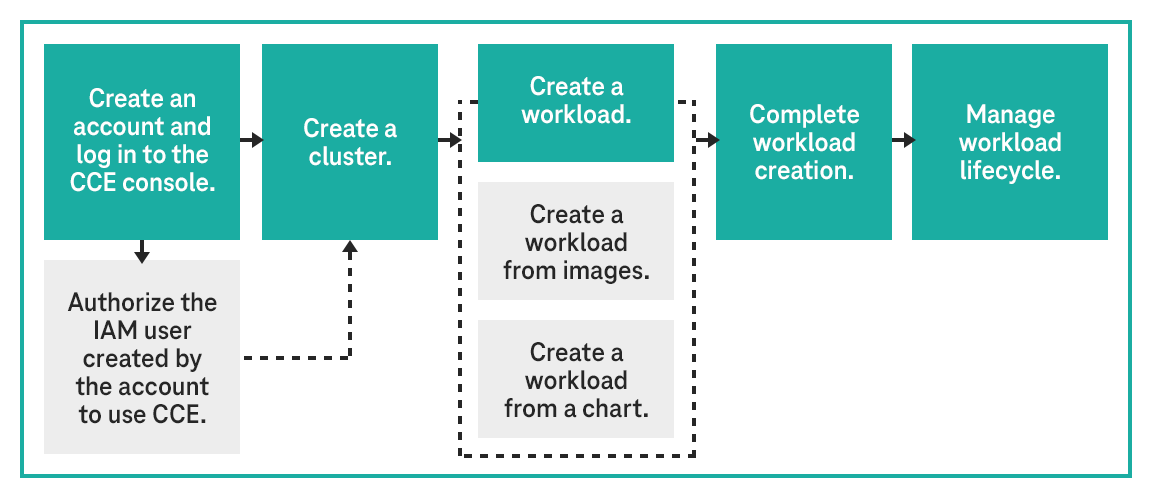
Getting Started with Cloud Container Engine
Step 1: Authorize an IAM user to use CCE
The accounts have the permission to use CCE. However, IAM users created by the accounts do not have the permission. You need to manually assign the permission to IAM users
*Voucher can be redeemed until 31 December 2026 and expires two months after conclusion of the contract. The credit is deducted according to the valid list prices as per the service description. Payment of the credit in cash is excluded.
Take advantage of our consulting services! Our experts will be happy to help you.
We will answer any questions you have regarding testing, booking and usage – free and tailored to your needs. Try it out today!
*Voucher can be redeemed until 31 December 2026 and expires two months after conclusion of the contract. The credit is deducted according to the valid list prices as per the service description. Payment of the credit in cash is excluded.
T Cloud Public Community
This is where users, developers and product owners meet to help each other, share knowledge and discuss.
Discover now
Free expert hotline
Our certified cloud experts provide you with personal service free of charge.