TaurusDB is the latest generation enterprise-class distributed database. It is fully compatible with MySQL and provides high scalability and massive storage capacity. It uses a decoupled compute and storage architecture and supports up to 128 TB of storage. With TaurusDB, there is no need to deal with sharding, and no need to worry about data loss. It combines the performance and availability of commercial databases with the cost-effectiveness of open-source databases. A TaurusDB instance consists of one primary node (write node) and multiple read replicas (read-only nodes). They share the underlying Data Functions Virtualization (DFV) storage.
During the creation of a TaurusDB instance, a read replica is created by default in addition to a primary node. If the primary node fails, the system automatically switches to a read replica with the highest priority and the original primary node is restored in the background.
Reasons for TaurusDB in T Cloud Public
Superior performance and MySQL compatibility
TaurusDB delivers million-level QPS and seven times the performance of native-MySQL. In addition, TaurusDB is fully compatible with MySQL. Therefore, it is not necessary to reconstruct original MySQL applications.
High scalability
TaurusDB uses a decoupled compute and storage architecture and supports horizontal and vertical scaling. With TaurusDB, creating read replicas or changing instance specifications takes only a few minutes. TaurusDB has 1 write and 15 read-only nodes and provides up to 128 TB of storage.
Stability and reliability
DB instances can be deployed across Availability Zones (AZs) and there are three data copies under the shared distributed storage layer which ensures zero data loss (zero Recovery Point Objective (RPO)) and service recovery within seconds.
Key Features of TaurusDB
Secure
TaurusDB makes it easy to control network access to a customer database. It also lets you run your DB Instances in a Virtual Private Cloud (VPC), which allows customers to isolate their DB Instances and to connect to them from their existing IT infrastructure through an industry-standard encrypted IPsec VPN. Besides, TaurusDB supports the use of SSL to secure data in transit to avoid eavesdropping man-in-the-middle-attacks.
Please note: SSL connections are enabled by default. You can download the SSL Certificate Chain (CA) and upload it when using database clients to connect to databases for authentication.
Immediately ready for use
TaurusDB reduces the time to market. Relational databases can be set up and used in minutes without requiring the deployment of any dedicated database instances or servers.
Easy to manage
DB instances can be easily set up, operated, and scaled. You can also efficiently perform database O&M, including connecting their applications to DB instances, migrating data, backing up and restoring, and monitoring. The Cloud Eye console provides an overview of key operational metrics, including CPU, memory, storage capacity utilization, I/O activity, and database connections.
Cost-effective
The required resources can be flexibly adjusted to your service requirements, so you only pay for what you use. You can start with low specification DB instances without up-front fixed capital expenditures (CAPEX). TaurusDB has only one copy of storage. When you add a read replica, only one compute node needs to be added and you do not need to purchase additional storage. The more read replicas you create, the more storage costs you save.
Active-active architecture
TaurusDB does not have standby databases. All read replicas are in active state and bear read traffic.
Log data structure
Pages no longer need to be flushed and written to the doublewrite buffer. All update operations are recorded as logs, reducing the bandwidth usage.
High-speed backup
RDS for MySQL uses physical backups for which the required time for the backup is determined by the amount of data. To backup TB-level data, it takes several hours. TaurusDB uses the Log Stream, which allows TB-level data to be backed up and restored within minutes.
User permissions and interconnected services
TaurusDB provides two types of user permissions by default: user management and resource management.
User management refers to the management of users, user groups, and user group permissions.
Resource management refers to the control operations that can be performed by users on cloud service resources.
The following listing shows the relationship between TaurusDB and other services.
Elastic Cloud Server (ECS)
Elastic Cloud Server (ECS) enables access to TaurusDB instances through an ECS to reduce application response time and public network traffic fees.
Cloud Eye (CES) acts as an open monitoring platform that monitors TaurusDB resources in real time. Cloud Eye reports alarms and promptly issues warnings to ensure that services are running properly.
Cloud Trace Service (CTS)
Cloud Trace Service (CTS) provides records of operations on cloud service resources, enabling you to query, audit, and backtrack operations.
Product architecture
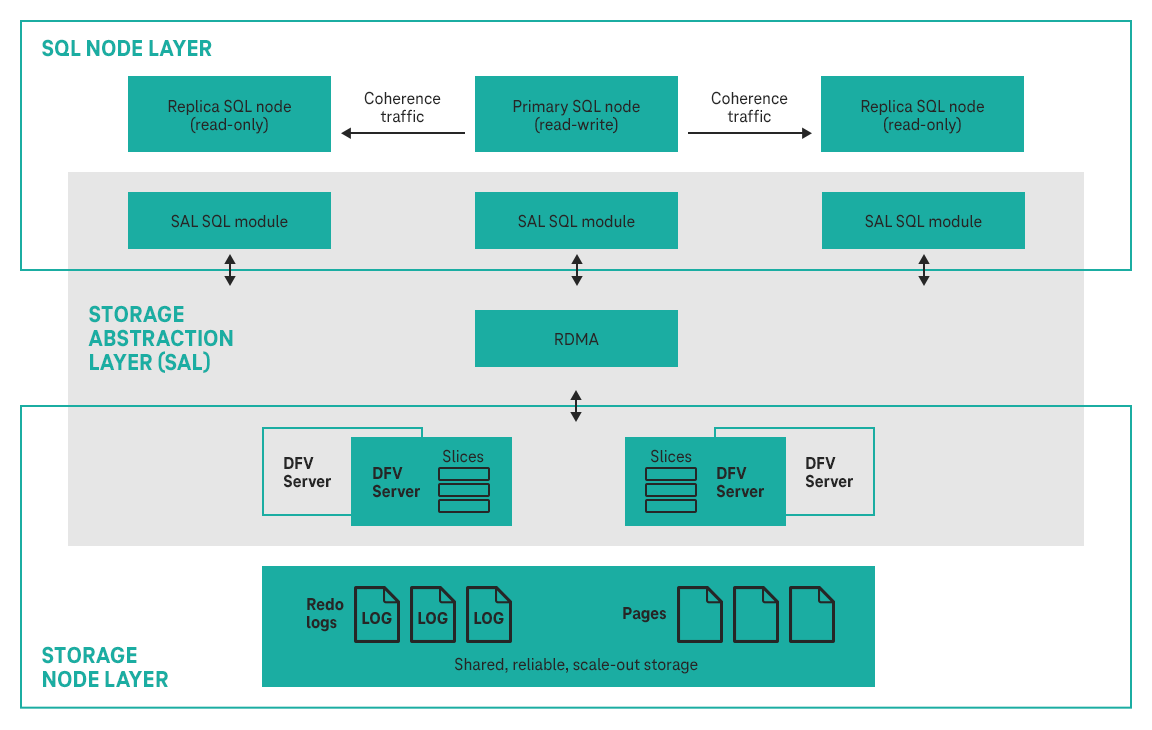
The TaurusDB architecture consists of three layers. From bottom to top, they are:
Storage node layer Data functions virtualization (DFV) storage provides distributed, strong-consistency, and high-performance storage, featuring high data reliability and excellent horizontal scalability. The data reliability is no less than 99.999999999% (11 nines). DFV is a solution for a data-centric full-stack service architecture with decoupled storage and compute.
Storage abstraction layer This layer is key to ensuring database performance. It connects to the DFV storage pool below it and provides semantics upwards for ensuring efficient storage scheduling. Table file operations are abstracted into distributed storage.
SQL parsing layer The SQL parsing layer is 100% compatible with open-source MySQL 8.0. You can use MySQL-native syntax and tools to migrate your workloads from MySQL to TaurusDB, saving you time and effort. In addition to full compatibility with MySQL, TaurusDB comes with an optimized kernel and a hardened system. It is part of an open ecosystem and provides commercial capabilities of native MySQL.
RDS for My SQL and TaurusDB in comparison
RDS for MySQL
TaurusDB
Architecture
RDS for MySQL has a traditional primary/standby architecture. Data is synchronized between the primary and standby nodes using binlog.
TaurusDB has one decoupled storage and compute architecture. Compute nodes share the same data which does not need to be synchronized using binlog.
Performance
Hundreds of thousands of Queries per second (QPS), delivering three times the performance of the open-source MySQL in high concurrency.
Millions of Queries per second (QPS), delivering seven times the performance of the open-source MySQL. In complex queries, operations, such as column extraction, conditional filtering, and aggregation calculation, can be pushed down to the storage layer, improving the performance by dozens of times compared with traditional databases.
Scalability
Up to five read replicas can be added for an instance. The time required for adding read replicas depends on the data volume. Adding read replicas require additional storage.
The storage can grow as needed, with up to 4 TB per instance.
Up to 15 read replicas can be added for an instance. Thanks to the shared storage, the time required for adding read replicas is not affected by the data volume. In addition, no additional storage is needed for read replica creation.
The storage grows as needed with up to 128 TB per instance.
Availability
If the primary instance fails, the standby instance can be automatically promoted to the primary, with a Recovery Time Objective (RTO) of less than 30s.
If the primary node is faulty, a read replica can be automatically promoted to the primary, with a Recovery Time Objective (RTO) of less than 10s. It has lower latency than RDS for MySQL because no data synchronization is required between the primary node and read replicas using binlog.
Backup restoration
Data can be restored to a specific point in time using full backups and binlog playback.
Data can be restored to a specific point in time using full backup (snapshots) and redo playback. The restoration speed is faster compared to RDS for MySQL.
DB engine version
MySQL 5.6, 5.7, and 8.0
MySQL 8.0
Neue Features
New GaussDB (for MySQL) Service is now available in EU-DE regionView Details
Renaming of Database service GaussDB (for MySQL)View Details