Help & ContactMarketplaceCommunityDEENDEENDiscoverSolutionsIndustriesHealthcarePublic SectorScience and researchAutomotiveMedia and broadcastingRetailUse CasesArtificial intelligenceHigh Performance ComputingBig data and analyticsInternet of ThingsDisaster RecoveryData StorageTurnkey solutionsTelekom cloud solutionsPartner cloud solutionsSwiss T Cloud PublicReferencesProductsCloud ServicesRoadmapRelease NotesService descriptionCertifications and attestationsManaged ServicesBenefitsSecurity/GDPRSovereigntySustainabilityOpenStackMarket leaderBusiness NavigatorPricesPricing modelsComputing & ContainersStorageNetworkDatabase & AnalysisSecurityManagement & ApplicationsPrice calculatorResourcesPartnerCIRCLE PartnerTECH PartnerBecome a partnerAcademyTraining & certificationsCommunityStudies and whitepaperWebinarsBusiness NavigatorMarketplaceDiscover appsBecome a sellerNewsBlogFairs & eventsSuccess StoriesSupportSupport from expertsAI chatbotShared ResponsibilityGuidelines for Security Testing (Penetration Tests)Mobile AppHelp toolsFirst stepsTutorialStatus DashboardSwitch of cloud providerFAQTechnical documentationHelp & ContactMarketplaceCommunity

0800 3304477 24 hours a day, seven days a week

Contact our support

Book now and claim 250 € starting credit
DiscoverSolutionsIndustriesUse CasesTurnkey solutionsSwiss T Cloud PublicReferencesProductsCloud ServicesManaged ServicesBenefitsBusiness NavigatorPricesPricing modelsPrice calculatorResourcesPartnerAcademyMarketplaceNewsSupportSupport from expertsHelp toolsTechnical documentation
  • 0800 330447724 hours a day, seven days a week
  • Contact our support
Book now and claim 250 € starting credit
 

Audit reports for download via self-service

The audit reports (SOC, C5) of T Cloud Public are now available through a user-friendly self-service portal in myWorkplace. This allows you to access the necessary reports directly and efficiently.

To download the reports, please follow these three steps:

1. Login to myWorkplace

First, log in to your myWorkplace account.

2. Select the “Audit Reports of T Cloud Public” tile

After logging in successfully, you will find the “Audit Reports of T Cloud Public” tile in your dashboard.
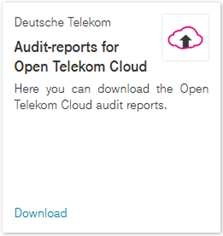
 

Click the “Download” link to proceed to the next page.

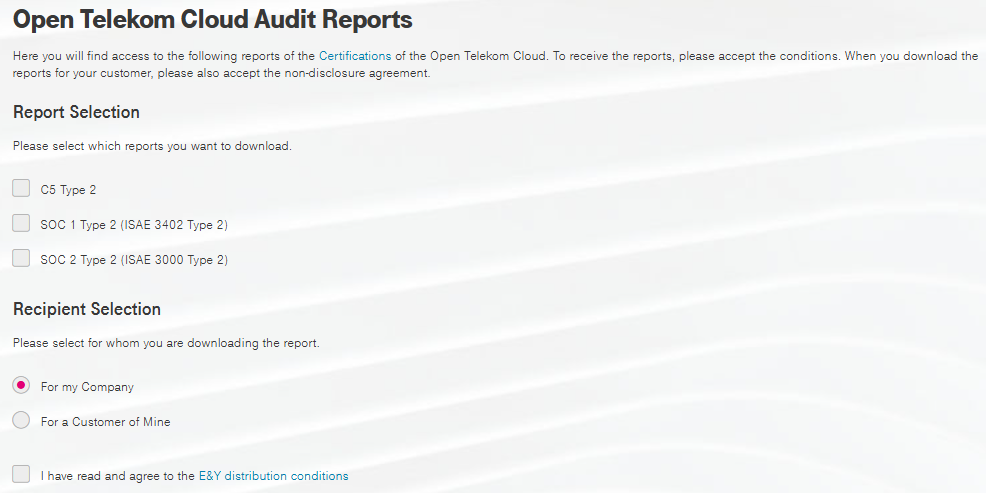
3. Enter relevant data and download the report

Depending on the intended use of the report, there are two different procedures:

  • For your own use:
    Select the desired reports and agree to the auditors' terms of distribution.
  • For an end customer:
    Enter the end customer's address details. In addition to agreeing to the auditors' terms of distribution, you must also agree to a confidentiality obligation and comply with the specified conditions.
T Cloud Public Community

This is where users, developers and product owners meet to help each other, share knowledge and discuss.

Discover now

Free expert hotline

Our certified cloud experts provide you with personal service free of charge.

0800 3304477 (from Germany)

+800 33044770 (from abroad)

24 hours a day, seven days a week

Write an E-Mail

Our customer service is available free of charge via E-Mail

Write an E-Mail

AIssistant Cloudia

Our AI-powered search helps with your cloud needs.